Project Overview :
● Here we using easyocr module to read the text from the image. EasyOCR will automatically download the required model files. Depending on your hardware, this might take a few seconds to load the model into memory.
● Once it's finished, you may continue reading photos without having to execute this code again.
● There are various optional parameters we may send here in addition to the list of language code.
Note: Code and image should be in the same folder.
Requirements :
● Python
● VS code
● Library – easyocr
● Input file – Image .png or .jpeg format
Input file :
● Input image file which we want to read the text from image.
.png)
Code :
import easyocr
reader = easyocr.Reader(['ch_sim','en'], gpu= True)
result = reader. readtext('Image.png',detail=0)
print('Success')
print(result)
Code Explanation :
● import easyocr
● import easyocr -- import easyocr and use it in python. In command prompt or VS code terminal run the below pip command to install easyocr library,
● pip3 install easyocr
● EasyOCR will attempt to employ the graphics processing unit (GPU) in computation if feasible if the first parameter, gpu, is set to True by default.
● reader = easyocr.Reader(['ch_sim','en'], gpu= True)
● Need to run only once to load model into memory. Set the image file with extension to read the text.
● result = reader. readtext('Image.png',detail=0)
● Print success after read the text.
● print('Success')
● Print the text read from the image.
● print(result)
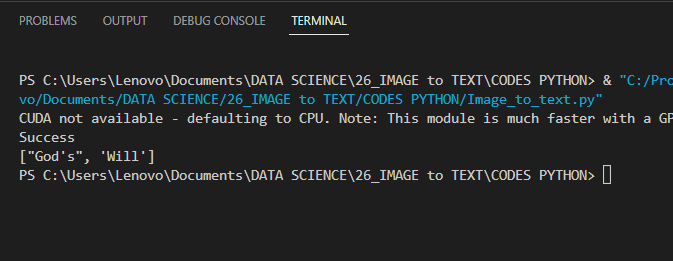
Output :
●After running the code, output of the terminal as given below,